
How to use a Scrabble photo solver
Scrabboard Solver ·
A Scrabble photo solver analyses the complete board position and your rack. Scrabboard Solver uses AI to recognise letters in the image on Android and iOS, then finds playable words and scores using your chosen dictionary and rules.
Prepare a clear photo of the whole board
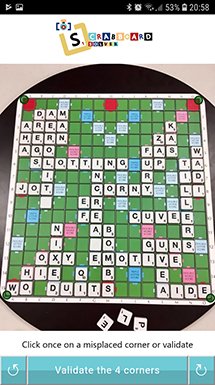
Keep all four corners in the picture so the application can locate the board. Take the photo with even lighting and avoid reflections on glossy tiles. Move closer if letters are difficult to read, while keeping the complete board visible.
For a physical game, include your tiles to play somewhere below the board in the photo: their letters are recognised automatically. Check the recognised rack, which determines the playable words together with the letters already on the board.
Import, configure and check your position
The dictionary decides which words are allowed. The board type determines the layout and bonus squares. Both should match the game you are analysing.
- Open Scrabboard Solver and take a photo, or select an existing image from your gallery.
- Choose the matching board type and dictionary.
- Check the board corners, recognised letters and rack. Correct any mismatch and identify blank tiles.
- Ask for solutions and compare their scores on the virtual board.
Use the solution to understand your options
Start by comparing your own move with the highest-scoring suggestion. Look at how the new word uses existing letters and bonus squares. You can also explore other playable words rather than choosing the first result.
If you want to practise, use hints before revealing the full solution. A clue about the score, word length or first letter can help you find the move yourself.
Improve a difficult recognition result
When a letter is incorrect, adjust it manually and analyse the corrected position. If several letters are unclear, take another photo with less glare, better focus or more even lighting.
If the recognised board looks right but a word seems unexpected, check the selected dictionary and rack, including any blank tiles. A word accepted in one dictionary may not be accepted in another.
Letter recognition and solution calculation run locally. See the privacy page for details.
App StoreiOS · iPhone · iPad
Available for Android phones and tablets, iPhone and iPad (iOS).
Free to download.